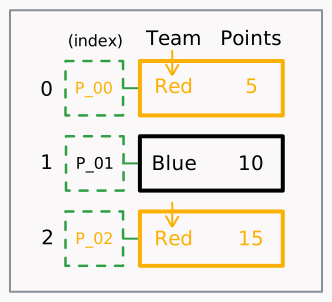
select by column label (it doesn’t have to be a string)
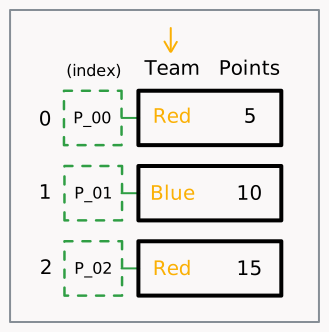
# an exampleselector = 'Team'
use that selector
used on the [] operator.
column = df[selector]
Multi-Column Selection
If u want to select multiple columns, simply change the selector to a list of their identifiers (usually their names).
Rows Selection
To select row(s), u do the following:
determine the selector
use that selector
Case A
(direct lookup)
determine the selector
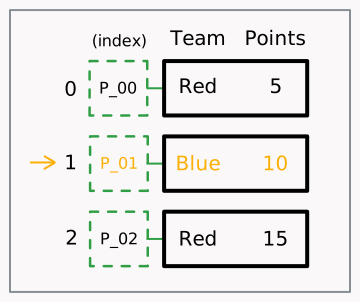
select by its index label (it doesn’t have to be a string)
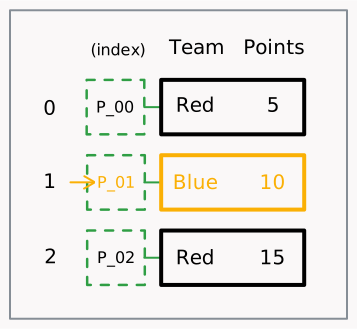
# an exampleselector = 'P_01'
use that selector
used on the .loc operator.
row = df.loc['P_01']
Case B
(direct lookup)
determine the selector
select by its position (the selector is always an int)
# an exampleselector = 1
use that selector
used on the .iloc operator.
row = df.iloc[1]
Case C
(*lookup based on some “criteria”)
determine the selector
select by some column value criteria (the selector usually is a pandas boolean mask)
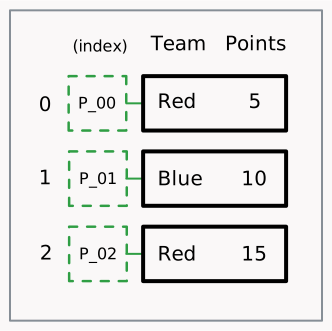
# an exampleselector = df['Team'] == 'Red' # select rows that their 'Team' column value is 'Red'# it evaluates to this (a pandas bool mask)"""P_00 True P_01 FalseP_02 True"""
use that selector
used on the [] operator.
rows = df[selector]
Multi-Row Selection
In direct lookup (Case A: .loc and Case B: .iloc), if u want to select multiple rows, simply change the selector to a list of their identifiers.
Row then Column selection
You can also use a row and then column selector, using the .loc operator.